During the incident
- Start a timestamped incident record
- Keep a reference sound-level timeline
- Save on-device audio when enabled
- Capture duration and optional location context
Product walkthrough
SilentProof is designed for recurring noise that is difficult to explain from memory. The workflow keeps one incident intact from capture through follow-up.

Step 1 · Capture
The record begins with a start time and ongoing duration. The phone adds reference sound data and, when you enable it, an audio file that stays attached to the local incident.
Keep the microphone clear and the phone in a repeatable position. Handling, cases, furniture vibration, room reflections, route, and model can change the reading.
Audio may capture identifiable speech. Recording and sharing rules vary by location.Review consent and privacy basics before keeping or sharing audio.

Step 2 · Context
Add a neutral description, perceived location, room conditions, impact, and follow-up. Review the record before sharing rather than sending a folder of unlabeled clips.
Use the documentation checklist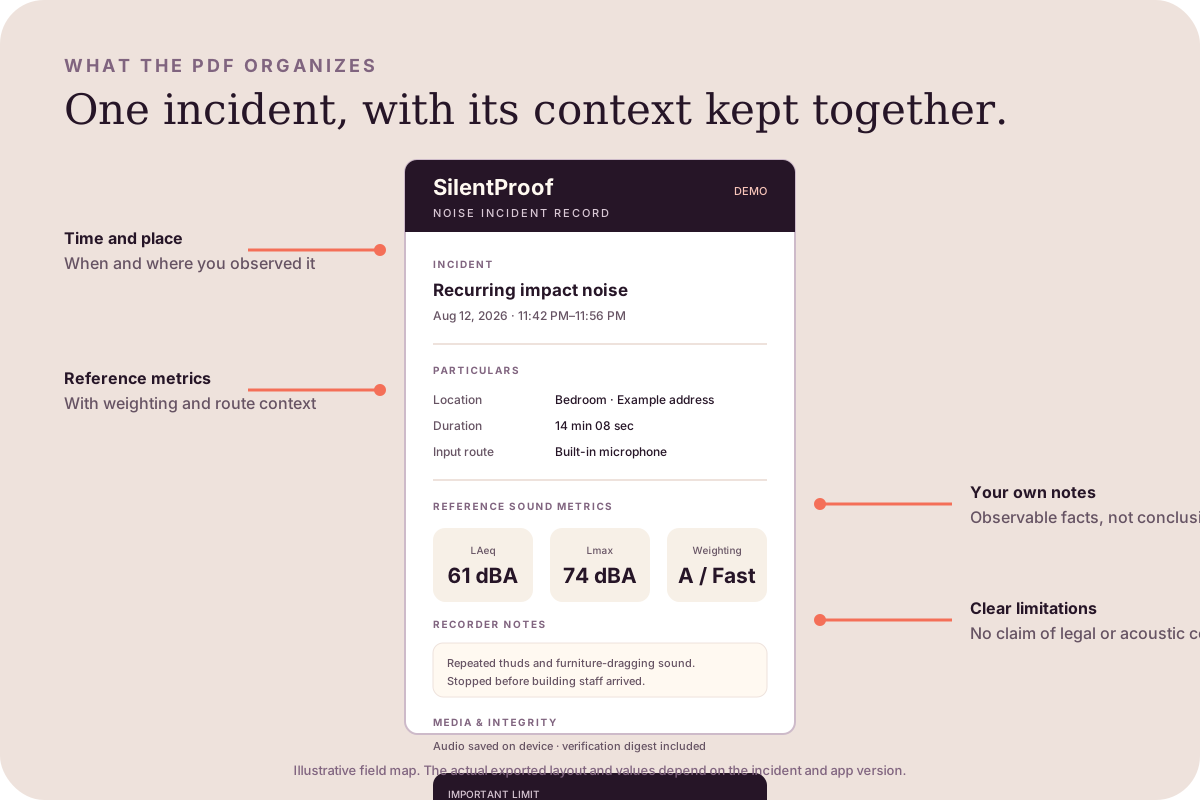
Step 3 · Export
The PDF organizes incident particulars, reference metrics, notes, media status, and limitations. It does not submit a complaint or certify that a law was broken.
See the sample report anatomyFeature map
Free
Keep unlimited incident records and export your first PDF. No account is required.
Pro
One-time in-app purchase; no recurring subscription. Local App Store pricing may vary.